Update February 22, 2013: Please do not use the code I present in this article anymore. The iOS SDK has progressed tremendously since I wrote this post in 2010, and now provides a native implementation of the page curl gesture/animation in the form of UIPageViewController. This API is a lot more flexible and easier to use than the Leaves project discussed here.
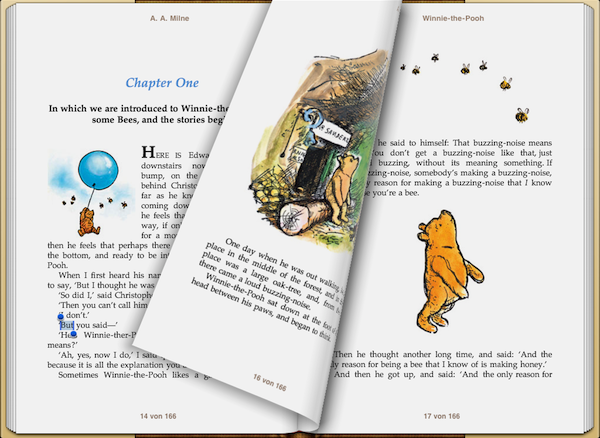
Even if its usefulness is questionable, the page curl has become one of the signature effects of Apple’s iOS devices so it is no surprise that many developers would like to implement this effect in their apps.
Apple uses private APIs
The problem is that the page curl animation used by Apple is not exposed in a public and documented API. Steven Troughton-Smith did a great job at documenting how Apple’s implementation works in his post Apple’s iBooks Dynamic Page Curl. Although Steven’s sample code is a bit rough (as he admits himself), the inner workings become clear: Apple has written a custom Core Image filter that is accessible with the undocumented kCAFilterPageCurl constant. (Yeah I know, Apple actually tells us in the documentation that Core Image is not available in iPhone OS
. They lied.) This filter accepts two input values, inputAngle and inputTime, to control the angle from which the layer is curled up and the magnitude of the curl. For a page curl animation, we would animate inputTime from 0.0f to 1.0f. To attach the filter to a layer, simply add it to an array and assign the array to the layer’s filters property (ignoring that the documentation says this leads to undefined behavior. In this case, undefined behavior is exactly what we want.). From Steven’s code (edited for clarity):
@class CAFilter;
extern NSString *kCAFilterPageCurl; // From QuartzCore.framework

static CAFilter *filter = nil;

...

// In -touchesMoved:
filter = [[CAFilter filterWithType:kCAFilterPageCurl] retain];
[filter setDefaults];
[filter setValue:[NSNumber numberWithFloat:((NSUInteger)fingerDelta)/100.0] forKey:@"inputTime"];

CGFloat _angleRad = angleBetweenCGPoints(currentPos, lastPos);
[filter setValue:[NSNumber numberWithFloat:_angleRad] forKey:@"inputAngle"];
pageView.layer.filters = [NSArray arrayWithObject:filter];
The App Store-safe way
I hope Apple makes this public in the future (and if you want to have it, too, you should file a bug and request it). In the meantime, Tom Brow has written Leaves, a simple component that achieves a page curl effect through a very smart combination of mirrored and shaded layers (for translucent pages) and gradient layers (for shadows). Basically, Tom adds to the layer that contains the page content (topPage):
- an overlay to shade the page during the curl animation (
topPageOverlay), - a gradient layer that acts as the top page’s shadow during the curl (
topPageShadow), - a mirrored image of the page that will be displayed on the back of the topPage layer during the curl (
topPageReverseImage), - a nearly-white overlay to soften the
topPageReverseImage, - and the page below the current page that will become the new
topPageafter the curl has finished.
The end result is not quite as stunning as Apple’s solution but it is a very good workaround. As I played around with Tom’s code (I encourage you to take a look at it, it is very clean), I noticed that LeavesView did not support displaying two pages side by side in landscape mode, so I modified Tom’s code accordingly. At first, I planned to duplicate the entire layer hierarchy for the second page, but then I noticed that even in the side-by-side view it is enough if only the page on the right is animated. It was enough to add a leftPage layer, modify the page skipping algorithm (skip two pages instead of one) and the display of the topPageReverseImage layer (display an image of the next page instead a mirrored image of the current page). This is what you get:
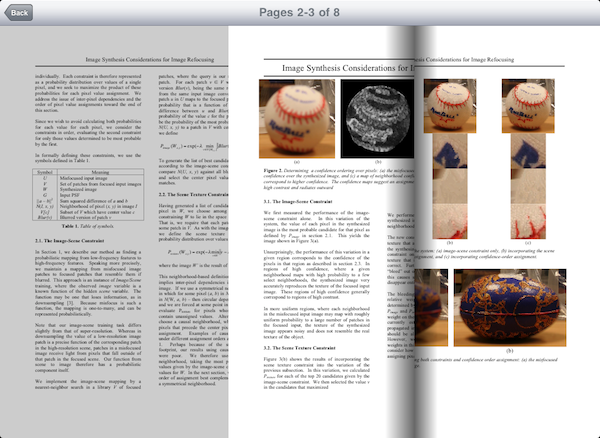
The code is not yet perfect: the topPageShadow is not aligned correctly and I struggled a bit with Tom’s implementation of the page image cache so the code in that section is quite rough. Tom has not yet integrated my modifications into his repository but you can already check out my twopages branch (I love GitHub!). When there is time, I hope we can improve it even more.
Update June 21, 2010: John from maniacdev.com made a nice screencast of the effect in action. Thanks!
Update August 31, 2011: Mark Hammonds has written a very good tutorial how to use Leaves in your own app. He also lists a few alternatives to Leaves that are worth a look.